Understanding Google Local Search Ads, Google Ads, and Google Business Profiles: Which One is Right for Your Business?

If you’re looking to market your business online, you’ve probably heard of Google Local Search Ads (LSAs), Google Ads, and Google Business Profiles (formerly Google Maps or Google My Business). The confusion surrounding these terms is common, but understanding their differences can significantly impact how you promote your business effectively on Google.
 
In this guide, we’ll break down these key digital marketing tools, explaining how each works, their advantages, and how they fit into a well-rounded marketing strategy.

What Are Google Local Search Ads (LSAs)?

Local SEO vs Google LSA vs Google Ads vs Google Maps. What's the Difference?

Google Local Search Ads, also known as Google Guaranteed ads, appear at the top of search results when someone looks for a service in their area. These ads are labeled as “Google Guaranteed,” signifying that Google has vetted and approved the businesses listed.

How LSAs Work

  • Businesses must apply and pass Google’s verification process, which includes background checks and licensing requirements.
  • LSAs operate on a pay-per-lead model, meaning you are only charged when a potential customer contacts you via the ad.
  • Google determines the cost per lead, which can range from $35 to over $100, depending on the industry and location.

Pros and Cons of LSAs

Pros:
  • Prime visibility at the top of search results.
  • Pay only for actual leads, not just clicks.
  • Builds trust with Google’s verification badge.
Cons:
  • Requires extensive approval and documentation.
  • Lead costs are determined by Google and may be high.
  • Limited control over ad customization.

Pros and Cons of Local Service Ads

Google Ads: The Traditional Pay-Per-Click (PPC) Option

The Pros and Cons of Google Ads for your Business

Google Ads are another set of paid results. Unlike LSAs, Google Ads operate on a pay-per-click (PPC) model, meaning businesses are charged each time someone clicks their ad.

How Google Ads Work

  • Businesses create ads targeting specific keywords.
  • Ads link to landing pages where potential customers can learn more or take action.
  • The cost per click (CPC) varies based on competition and industry, sometimes reaching $50+ per click.

Pros and Cons of Google Ads

Pros:
  • Full control over ad copy, offers, and landing pages.
  • Can be optimized for conversions to lower cost per lead.
  • Allows precise targeting by location, keyword, audience, and device.
Cons:
  • Requires ongoing management and optimization.
  • Costs can add up if not properly optimized.
  • Clicks don’t guarantee leads—conversion strategy is essential.

Pros and Cons of Local Service Ads

Google Business Profile (Formerly Google Maps or Google My Business)

What Is Google Business Profile?

Google Business Profiles, commonly known as Google Maps Listings, is a free tool from Google that enables businesses to manage their online presence on Google Search and Maps. It serves as a digital storefront that makes it easier for customers to find and engage with businesses.

How Google Business Profiles Work

  • Businesses create a profile, listing essential details like hours, services, and contact information.
  • Customers can leave reviews, and Google uses these to determine ranking in the local search pack.
  • The ranking is influenced by proximity, relevance, and review quality.

Pros and Cons of Google Business Profiles

Pros:
  • Completely free and highly visible in local search results.
  • Helps build credibility through customer reviews.
  • Can drive substantial leads without paid ads.
Cons:
  • No guaranteed ranking—Google determines placement based on factors like reviews and engagement.
  • Limited control over what Google prioritizes in search results.

Pros and Cons of Local Service Ads

Organic Search Results: SEO and Long-Term Visibility

Below Google Business Profiles, you’ll find the organic search results, which are based on search engine optimization (SEO). Ranking in organic results requires optimizing your website’s content, structure, and authority to increase visibility.

How SEO Works

Understanding SEO

Google Business Profiles, commonly known as Google Maps Listings, is a free tool from Google that enables businesses to manage their online presence on Google Search and Maps. It serves as a digital storefront that makes it easier for customers to find and engage with businesses.

  • Websites that provide valuable content and a great user experience rank higher.
  • Google considers factors like page load speed, keyword relevance, backlinks, and mobile-friendliness.
  • SEO is a long-term strategy but can generate significant free traffic over time.

Pros and Cons of SEO

Pros:
  • No direct advertising costs.
  • Builds long-term credibility and traffic.
  • Can capture high-intent searches.
Cons:
  • Takes time and effort to rank.
  • Requires ongoing optimization.
  • Rankings can fluctuate based on algorithm updates.

Pros and Cons of Local Service Ads

The Best Strategy for Your Business

If you’re wondering which Google marketing strategy is best for your business, consider these factors:
    1. Limited Budget? Start by optimizing your Google Business Profile since it’s free and can generate leads.
    2. Need Immediate Results? Invest in Google Ads to drive targeted traffic to a landing page.
    3. Looking for a Trust Badge? Apply for Google LSAs to leverage the credibility of Google Guaranteed.
    4. Long-Term Growth? Implement an SEO strategy to build sustainable organic visibility.
Ideally, a well-rounded approach incorporates all four, ensuring your business appears in multiple places on Google. If a potential customer searches for a service you offer and sees your ad under LSAs, your Google Ad, your Business Profile, and your website in organic results, your chances of converting that lead increase significantly.

Final Thoughts

Marketing your business on Google doesn’t have to be confusing. By understanding LSAs, Google Ads, Google Business Profiles, and SEO, you can make informed decisions about where to invest your time and budget.
 
At the very least, ensure your Google Business Profile is fully optimized with updated information and reviews. Then, as your business grows, explore Google Ads and LSAs for paid visibility while working on an SEO strategy for long-term success.

Want to dive deeper into Digital Marketing Strategies?

Check out our Service Marketing Simplified course, where we break down these concepts in detail to help you grow your business.

How to Improve Your Google Ads Ad Strength for Better Performance

If you’re running Google Ads, you’ve probably noticed the Ad Strength column in your account. It may say your ad is poor, average, or limited, and you’re wondering how to fix it. The stronger your ad strength, the better your ad performance and visibility.
 
In this guide, we’ll walk through simple but effective tips to improve your Google Ads ad strength and optimize your campaigns for more conversions.

Understanding Google Ads Ad Strength

Google Ads assigns an ad strength score based on how well your ad meets their best practices.

The scale goes from Poor → Average → Good → Excellent.

Improving this score can increase your ad visibility, reduce CPCs (cost per click), and improve conversions.

1. Use All Available Headlines and Descriptions

Google provides up to 15 headlines and 4 descriptions—use them all! This gives Google the flexibility to test different combinations and improve performance.
 

How to Do It:

  1. Go to your Google Ads campaign → Select the Ad → Click Edit.
  2. Ensure all 15 headlines and 4 descriptions are filled in.
  3. Use a mix of keywords, unique selling points, and calls to action in headlines.
  4. Avoid repeating the same phrases—Google favors variety.
📌 Pro Tip: If your ad strength is still low, check Google’s recommendations for missing or underperforming headlines.

2. Use High-Performing Keywords in Your Headlines

Google suggests adding popular and relevant keywords to your ad headlines. This increases your Quality Score and improves relevance.


How to Find the Right Keywords:

  1. Click View Asset Details in your ad editor.
  2. Sort by Impressions to see which headlines perform best.
  3. Remove underperforming headlines and replace them with Google’s keyword suggestions.
📌 Pro Tip: Use Google’s keyword recommendations but make sure they match your target audience’s intent.

3. Remove Low-Impression Headlines

If you’re unsure which headlines to replace, remove low-impression headlines that aren’t contributing to performance.
 

How to Identify Low-Impression Headlines:

  1. Go to View Asset Details in your ad settings.
  2. Sort by Impressions—look for headlines with low or no engagement.
  3. Replace them with new, relevant, and high-performing headlines.
📌 Pro Tip: Ads with fresh and optimized headlines tend to improve ad strength quickly.

4. Avoid Over-Pinning Headlines and Descriptions

Pinning forces a headline or description to appear in a fixed position. While this can help with brand consistency, excessive pinning can hurt your ad strength.


What to Do Instead:

  • Only pin essential elements (e.g., your brand name, primary offer).
  • Allow Google to rotate different headlines and descriptions for better performance.
  • If you have a poor or average ad strength, try unpinning some elements and resaving the ad.
📌 Pro Tip: Google prioritizes variety—let it mix and match for the best results.

5. Refresh & Save Your Ad for Immediate Improvement

Sometimes, just making a small edit and resaving your ad can improve ad strength immediately.
 

How to Do It:

  1. Edit underperforming headlines.
  2. Unpin overused descriptions.
  3. Click Save Ad and wait for Google to update its strength rating.
📌 Pro Tip: Google’s ad strength can update within minutes—check back after a few hours.

Final Thoughts: The Power of Ad Strength Optimization

Improving your Google Ads ad strength isn’t just about increasing a score—it directly impacts your campaign success. Stronger ads lead to Higher visibility, Lower CPCs and More conversions.

Prefer an Expert to Handle Your Ads?

If you want a Google Ads expert to run your campaigns, Mancini Digital specializes in Google Ads for local service companies. We help businesses get more calls, more appointments, and more revenue.
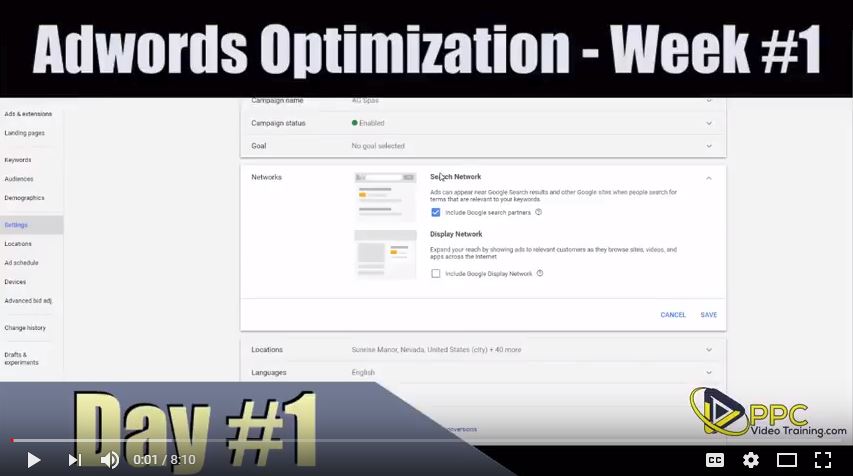
Adwords Optimization Series… Day #4

Adwords Optimization Series… Day #4

On our parter website PPCVideoTraining.com, we’re continuing our series on Adwords Optimization. What to do during the first 7 days of your Adwords campaign being live.

This video focuses on keywords. How many keywords should you have in your Adwords campaign? Not only how many keywords, but how the keywords should be organized so that you get the best results from your Adwords campaign.

Hope it helps!

Ad Scheduling for Google Adwords

Ad Scheduling for Google Adwords

On our parter website PPCVideoTraining.com, we’re talking about ad scheduling. Why is this so important?

Imagine seeing that you get 200 clicks per month between the hours of 12am and 6am and not ONE of them converted to a sale. Do you really want to keep advertising during that time? Of course not.

So, here’s how to determine when your ads are converting, where to see it and what to do about it. This is sometimes called Dayparting as well. Hope it helps!

Google Adwords Campaign Not Spending its Daily Budget?

Google Adwords Campaign Not Spending its Daily Budget?


Over on our partner website PPCVideoTraining.com, today we’re talking about what happens when you have a great Google Adwords campaign running, but there’s just one problem. The campaign won’t spend all of your budget.

You’re killing it with sales… the campaign is running great… why won’t it spend any more money? I want more sales.

Well, in this video we discuss a number of reasons why that may be happening and how to fix it. Check out this Adwords budget tutorial. Hope it helps!

What is a Good Click Through Rate or CTR?

What is a Good Click Through Rate or CTR?

Over on our PPC Video Training website, today we talk about what’s a good click-through rate or CTR for your Google AdWords or pay-per-click account?

Every single person and even a lot of big agencies have a different number that they consider the ideal CTR or (Click through rate). So, we took a look at what Google says is the average CTR and also a few other large PPC agencies. You get the idea… take a look and let us know what you think is the idea CTR.

Full transcription of the video can be found at: http://www.ppcvideotraining.com/whats-a-good-click-through-rate-or-ctr/